Ready to take your journey in STARSEED: Asnia Trigger to the next level with exclusive rewards? Redeem codes are your ticket to unlocking special items and accelerating your progress in the game. Here's a complete guide on how to make the most of these codes.
Active Redeem Codes for STARSEED: Asnia Trigger
GET5STARSEEDGIRLS
STARSEEDFREEGIFT
How to Redeem Codes in STARSEED: Asnia Trigger?
Redeeming codes in
STARSEED: Asnia Trigger is a breeze. Follow these simple steps to claim your rewards:
- Complete the Tutorial: Before you can dive into redeeming codes, make sure you've completed the game's tutorial.
- Access the Main Menu: Tap on the settings icon to enter the game’s main menu.
- Navigate to Account Section: In the settings menu, head over to the Account section.
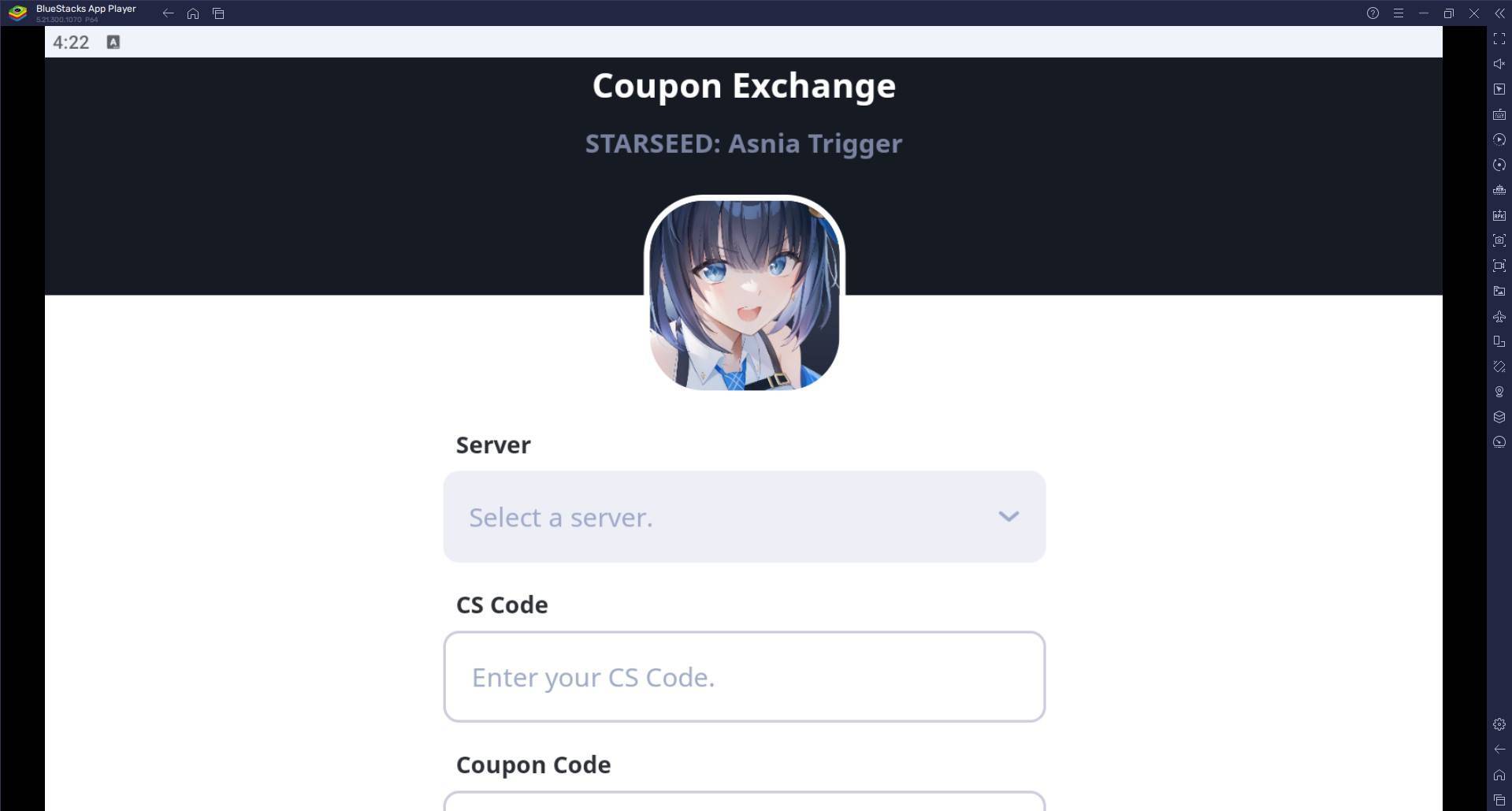
- Copy Your CS Code: You'll see your CS code displayed at the top of the screen. Copy it.
- Visit the Redemption Website: Head over to this website and paste your CS code along with your redeem code in their respective fields.
- Claim Your Rewards: Once you've submitted the codes, your rewards will be sent directly to your in-game mailbox.
Troubleshooting: What to Do If Your Redeem Codes Aren't Working
Encountering issues with your redeem codes? Here's how to troubleshoot:
- Double-Check the Code: Make sure you've entered the code correctly, paying attention to any potential typos or extra spaces.
- Check the Expiry Date: Codes often have an expiration date. Ensure yours is still valid.
- Look for Restrictions: Some codes may have regional or level-based restrictions. Confirm you meet all the criteria.
- Contact Support: If the code still doesn't work, don't hesitate to reach out to the game's customer support for help. They're there to assist you.
For an enhanced gaming experience, consider playing STARSEED: Asnia Trigger on your PC or laptop with BlueStacks. Enjoy smoother gameplay and a larger screen to immerse yourself fully in the world of Asnia!

 Category